
Dashboard Overview - INTV Realtime Report
Overview
The Interviewer Dashboard (INTVDash) is a real-time monitoring tool that displays live calling activity broken down by interviewer, for every active project currently running on the phone room floor. It is accessible to anyone on the internal network and requires no login.
INTVDash is located in the Maxwell Portal, under PhoneOps Dashboard in the left-hand navigation menu.
How It Works
The dashboard automatically refreshes every 15 seconds and is active daily from 9:00 AM to 2:00 AM. When multiple projects are running simultaneously, each project appears as its own table on the same page, stacked vertically. A last update timestamp is displayed at the top of the page, reflecting the most recent data received from the system.
If you need to pause and review the numbers more closely, a Pause Refresh drop-down is available at the top of the page. Clicking it stops the auto-refresh until you resume it.
Reading the Dashboard
Each project table is labeled with its Job Name and contains one row per interviewer currently or recently assigned to that project. The first row is always a Shift Total, which provides a rolled-up summary across all interviewers for that project.
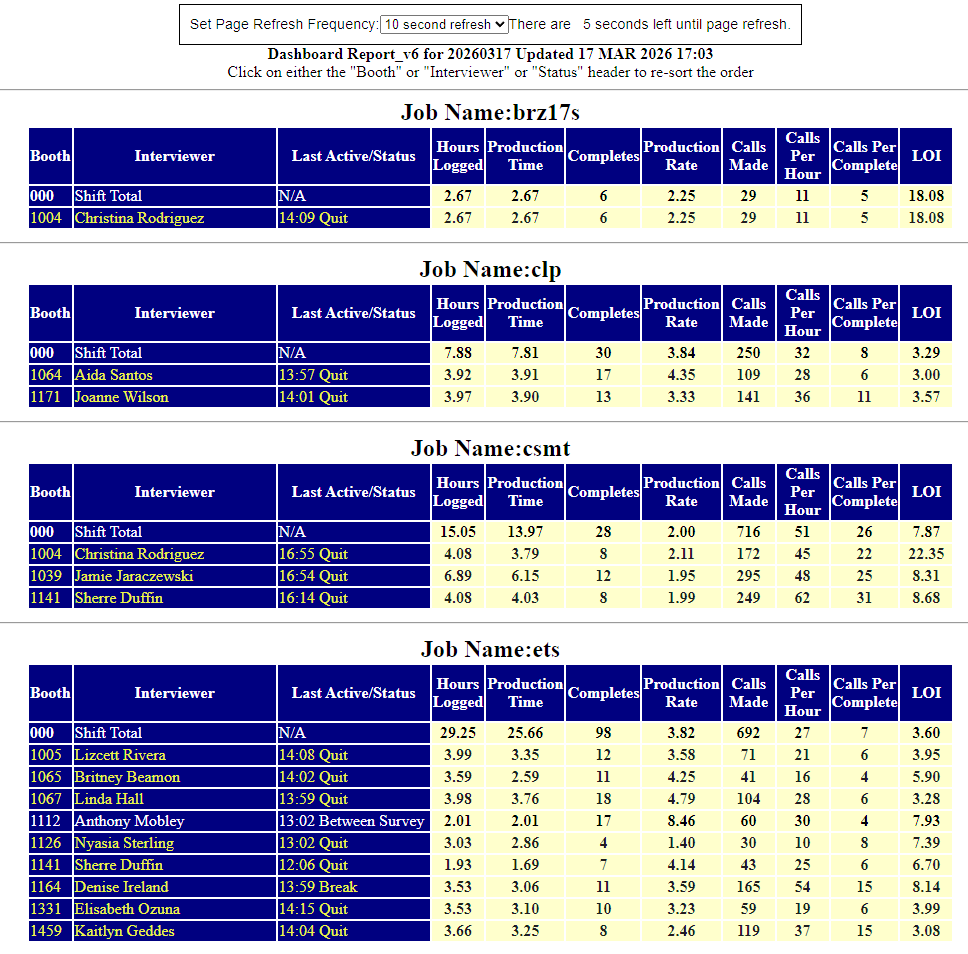
Column Definitions
| Column | Description |
|---|---|
| Booth | The interviewer's assigned booth number in the system. |
| Interviewer | The interviewer's name. |
| Last Active / Status | A timestamp and status code reflecting the last update received from that interviewer. See Status Codes below. |
| Hours Logged | Total hours the interviewer has been logged into the system during the current shift. |
| Production Time | Time spent actively in productive calling (excludes breaks, meetings, etc.). |
| Completes | Number of completed surveys recorded for this interviewer on this project. |
| Production Rate | Completes per production hour. |
| Calls Made | Total number of outbound calls placed by this interviewer. |
| Calls Per Hour | Average calls placed per production hour. |
| Calls Per Complete | Average number of calls required to achieve one complete. |
| LOI | Length of Interview -- the average duration (in minutes) of completed surveys for this interviewer. |
Viewing Historical Reports
At the bottom of every INTVDash page, two navigation links are available:

- Yesterday's Report (yyyymmdd) -- Loads the report for the previous day. The date is shown in the link label so you always know which day you are navigating to.
- Back to Most Current Report -- Returns you to today's live, auto-refreshing dashboard.
Historical data is available going back weeks to months. If you want to jump directly to a specific date rather than clicking through day by day, you can manually enter the date into the browser's address bar using the following format:
/dashboard_report_20260315.html
Replace 20260315 with the date you want to view in YYYYMMDD format.
Row Color Coding
A dash ( - ) in any numeric column indicates a zero or null value -- no data recorded for that interviewer in that category yet.
- White row -- Interviewer is currently logged in and active on the project.
- Yellow row -- Interviewer has logged out.
Status Codes
The Last Active / Status column displays the time of the last system update alongside one of the following status codes:
| Status | Meaning |
|---|---|
| Dialing | Interviewer is actively dialing outbound calls. |
| Screening | Interviewer is on a call and going through the screener portion of the survey. |
| In Interview | Interviewer is actively conducting a survey interview. |
| Wrap Up | Interviewer has finished a call and is completing any post-call wrap-up steps before dialing again. |
| Between Survey | Interviewer is between calls, waiting to be connected to the next dial attempt. |
| Quit | Interviewer has exited the project. Row will appear yellow. |
| Unknown Status | Typically happens when an interviewer logs in, and immediate back out. The dashboard looks for information sent via the survey script, to fill the status. If they never load a survey, Unknown Status will be shown. |
| Meeting | Interviewer is in a meeting and temporarily away from dialing. |
| Lunch | Interviewer is on a lunch break. |
| Break | Interviewer is on a short break. |