
Sample Management - Hiding/Revealing Sample (incl. Named)
Hiding and Revealing Sample
What Is It?
Hiding sample is a way to temporarily remove records from the dialing pool without deleting them. The server simply ignores hidden records when pulling numbers to dial. When you are ready, you can reveal them and they return to normal dialing rotation. This is useful when you need to pause certain records — for example closed quotas, low-performing segments, or to save sample for a later phase of a study. It is also the common practice when doing multimode projects, allowing a PD to hide records dedicated for SMS/Web, while the phone room dials the remaining sample.
The Two Types of Hidden Sample
Important: A record that is already standard hidden cannot be moved to named hidden. It must be revealed first, then re-hidden with a name.
Why Would You Hide Sample?
- A quota has closed and those records should stop dialing
- You want to focus dialing on a specific group (e.g., a particular state or age range)
- Certain record types are not performing (e.g., landlines for younger respondents, or cell phones for older age brackets)
- You want to hold sample in reserve for a later shift or phase
How to Hide or Reveal Sample
There are three ways to hide or reveal records. Each method requires a project name & select statement -- a select statement is code that tells the system which records to target. For example:
[51#1]targets landline records[5121.2$]="NY"targets all records coded as New York
You can also reveal hidden records without a select statement when you want to bring back all of them at once, using the "all" tag.
When doing NAMED HIDES/REVEALS, it is strongly recommended to use Method 3 -- Through the Console, as it is laid out in such a way as to not be as confusing for users, with clear input boxes to enter the various information needed. You can use the other 2 methods if you are comfortable enough with the syntax difference though.
Method 1 -- Via Foneutil (Job Not Active)
Used when the study is not loaded or actively dialing. This is the safest method when a project is still being configured, as it avoids accidentally affecting a job that DP may still be setting up. The below example code is executed via puTTY:
CfMC-phone10 /cfmc/phone10/active/fone>fone <enter>
CfMC-phone10 /cfmc/phone10/active/fone>foneutil <enter>

FONEUTIL ( 9May24) 10.4.2.1 Linux.x64 1004020001 20240509 (con,) - (C) Enghouse Interactive 2024
02 Mar 2026 10:53

List file--> <enter> ##if you put a name here, like hide.log it will save all the screen outputs to that file for later reference

Type study code, '$<fonefile name>' or 'quit'-->jobname1 <enter>

##EXAMPLE HIDE
'*' for HELP or 'Q' to quit (jobname1(rw)) -->hide [51#1] <enter>

(ascii) Enter SELECT statement or 'help'
control - y for status
Reading (1 dot per 100 records) ..................................................................................................................................................................................................................................................................................................................................................................................................................................................................................................................................................................................................................................................................................................
#READ(194466) #SELECTED(67669) #USED/CHANGED(581)
'*' for HELP or 'Q' to quit (jobname1(rw)) -->

##EXAMPLE NAMED HIDE
'*' for HELP or 'Q' to quit (jobname1(rw)) -->named_hide old [53#4] <enter>

(ascii) Enter SELECT statement or 'help'
control - y for status
Reading (1 dot per 100 records) ..................................................................................................................................................................................................................................................................................................................................................................................................................................................................................................................................................................................................................................................................................................
#READ(194466) #SELECTED(48453) #USED/CHANGED(48453)
'*' for HELP or 'Q' to quit (jobname1(rw)) -->

##EXAMPLE REVEAL
'*' for HELP or 'Q' to quit (jobname1(rw)) -->reveal all <enter>

(ascii) Enter SELECT statement or 'help' or 'ALL'
(136487) Record(s) in HIDDEN stack
Reading (1 dot per 100 records) ..................................................................................................................................................................................................................................................................................................................................................................................................................................................................................................................................................
#READ(136487) #SELECTED(136487) #USED/CHANGED(136487)
'*' for HELP or 'Q' to quit (jobname1(rw)) -->

##EXAMPLE NAMED REVEAL
'*' for HELP or 'Q' to quit (jobname1(rw)) -->named_reveal females all <enter>

(ascii) Enter SELECT statement or 'help' or 'ALL'
(136487) Record(s) in HIDDEN stack
Reading (1 dot per 100 records) ..................................................................................................................................................................................................................................................................................#READ(45570) #SELECTED(19253) #USED/CHANGED(19253)
(19253) Record(s) returned from NAMED_HIDE stack
replicates not being used; no repsorting done
'*' for HELP or 'Q' to quit (jobname1(rw)) -->

##TO EXIT
'*' for HELP or 'Q' to quit (jobname1(rw)) -->Q <enter>
Type study code, '$<fonefile name>' or 'quit'-->Q <enter>
In the above code, you can see that someone loaded the project jobname1 and it shows the (rw) prompt, meaning foneutil has the file open in Read/Write mode. If it shows (ro), then the file was loaded in Read Only mode, which means the hide/reveal will not work, as the study is actively open on the server.
After entering the study name, the user entered the hide command along with the select statement "[51#1]".
Progress is shown as "..." followed by the end result, reported as #READ() #SELECTED() #USED/CHANGED()
- #READ() will be the total number of records in the file in most cases, though when revealing, it only reads "hidden" records
- #SELECTED() is a count of how many numbers MATCHED the supplied select statement
- #USED/CHANGED() is how many records it ACTUALLY hid/revealed.
NOTE: IF SELECTED <> USED/CHANGED then either some of the records that match that select are either already hidden, resolved, or currently "at the dialer" or "on the floor" meaning they are actively being called or are connected with interviewers, and thus cannot be hidden. IN the above example, when hiding [51#1] there were 67.669 records that matched, but it only hid 581. The other ~62,000 were already hidden/resolved/named_hidden, so they couldn't be rehidden.
Method 2 -- Via Super/Boss (Interactive, Any Job State)
Commands are entered directly on the server. The job does not need to be inactive. You will enter the command, the job name, optionally a hidden name, and the select statement. using hide/reveal via a super/boss will load inactive jobs, so ensure that DP is not in the process of working on the sample behind the scenes, or you risk undoing their work, or possibly corrupting the files/locking the project. Similar to Methode 1, this method is also completed via puTTY:
##STARTING A super/boss session
CfMC-phone10 /cfmc/>super <enter>
*************************************************************************
**************************************************************************
*****      MAXIMUM RESEARCH SURVSUPR CONFIRMATION SYSTEM V1.0        *****
*****      --------------------------------------------------        *****
*****                                                                *****
***** YOU ARE ABOUT TO RUN A SURVSUPR SESSION WHICH DOES INTERACTIVE *****
*****   THINGS WITH FILES & MAY LOCK THE JOB OUT AND PREVENT OTHERS  *****
*****       FROM ACCESSING IT, OR INTERVIEWERS FROM STARTING UP.     *****
*****                                                                *****
*****  YOU SHOULD BE USING THE SURVOX CONSOLE INSTEAD, SINCE IT WAS  *****
*****  MEANT FOR THIS VERSION OF CFMC SOFTWARE AND DOESN'T LOCKOUT!  *****
*****                                                                *****
*****   ARE YOU SURE YOU WANT TO DO THAT AND RISK LOCKING OUT THE    *****
*****          PROJECT AND POTENTIALLY CAUSING DOWNTIME?             *****
**************************************************************************
**************************************************************************

IF YOU ARE SURE YOU WANT TO RUN A SURVSUPR SESSION, TYPE SUPER AGAIN: super <enter>

SURVSUPR ( 9May24) 10.4.2.1 Linux.x64 1004020001 20240509 (&?-/cfmc/phone10/support/suprinit,con) - (C) Enghouse Interactive 2024
02 Mar 2026 11:55
Log file /cfmc/phone10/logs/su260302115512.6976 opened as 6.  Logging has begun
Test access to stations/studies files (in CfMCCFG on DOS/unix)...   (done)
SUPERVISOR device #6976
connected to serverldev at 9901
SUPRINIT: (/cfmc/phone10/control/suprinit)

pause timeout/refresh set from 120 seconds to 300 seconds
Interviewer login timeout set to 0 minutes (was 30 minutes)
force_into_interview timeout/refresh set from 0 seconds to 60 seconds

##EXAMPLE HIDE
Enter a SUPERVISOR command-->hide jobname1 [53#2] <enter>
Starting 'hide/reveal/etc' of phone records or copy .tr ...

Enter a SUPERVISOR command--> <enter>

(HIDE-jobname1) 194376 cases read out of 194466.  #SELECTED(100461) #USED(100461)

server done with Hide/Reveal/Change_owner/copy/phone_operation

Enter a SUPERVISOR command--> <enter>

##EXAMPLE REVEAL
Enter a SUPERVISOR command-->reveal jobname1 [54#3] <enter>

Starting 'hide/reveal/etc' of phone records or copy .tr ...

Enter a SUPERVISOR command-->  <enter>

(REVEAL-jobname1) 100461 cases read out of 100461.  #SELECTED(20003) #USED(20003)

server done with Hide/Reveal/Change_owner/copy/phone_operation

##Quitting out of Super/Boss
Enter a SUPERVISOR command--> qui <enter>

Close the log file /cfmc/phone10/logs/su260302115512.6976

*** That is All ***

SURVSUPR ( 9May24) running &?-/cfmc/phone10/support/suprinit to con at 02 MAR 2026 12:01.
total time: 360 seconds elapsed,   0.30 seconds CPU time
*Note: when in a super/boss, if you hit <enter> one too many times, it will go into "sleep mode" where it just "dots" on the screen. To get back to the supervisor command prompt, press control+c to bring it back up.
Just like with the foneutil method, you can see the progress, showing #READ, #SELECTED, & #USED. The only real difference is that the commands require the jobname as well as the select, since a super/boss has access to all projects, whereas foneutil only loads the project you specify at the prompt.
Named Hide/Reveal via Super/Boss
The steps to do a named hide/reveal are almost the same, you just need to add the name to use in the statement, at just the right place. For example:
- Normal Hide/Reveal:
hide/reveal jobname select <enter> - Named Hide:
named_hide jobname name_to_use select <enter>- Names must be <30 characters, cannot contain spaces, and must start with a letter. They can include uppercase, lowercase, numbers and underscores "_" only.
- Named Reveal:
named_reveal jobname name_to_use select (or all) <enter>- using "all" will reveal ALL records within that name hidden "bucket"
- using a "select statement" will reveal just a subset of the name hidden sample. For example, if ALL Females are name hidden as "females", and you want to reveal just the ones over 50, you would put in the select for over 50 in, with the name "females":
named_reveal jobname females [54#3]
Method 3 -- Via Survox Console (Interactive, Any Job State) *PREFERRED METHOD
Located under Manage > Manage Sample > Hide/Reveal in the Survox Console web interface. Like Method 2, this works whether the job is loaded or not. The console gives a nice visual set of boxes to fill in, which clearly explains what belongs in them. After navigating to the Hide or Reveal option, you must first select the project from the dropdown. After selecting the project, you will be presented with option to select Live or Test... Always pick "Live" and then click " Select Records " ... After that, one of two screens will appear depending on if you selected HIDE or REVEAL:
Hide Sample - Console Mode
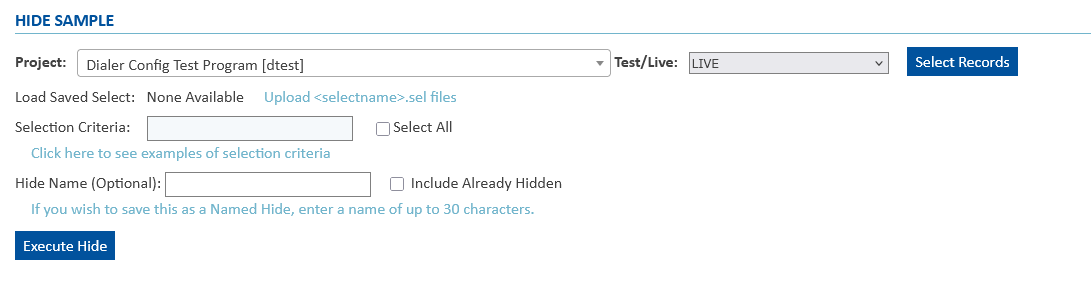
In the above image, you can see all the possible fields needed to fill out to execute the hide via the console:
- Selection Criteria: This is the "select statement/base" you want to use, i,e, [51#1] or [53#4] or [5121.2$]="NJ"
- Select All: Optionally, checking this INSTEAD of providing a select statement will do as it says, and hide ALL non-hidden sample
- Hide Name: If you want the hidden records to be "named_hidden" this is where you add the name you want. Names must be <30 characters, cannot contain spaces, and must start with a letter. They can include uppercase, lowercase, numbers and underscores "_" only.
- Include Already Hidden: This optional checkbox will MOVE other named_hidden records INTO the new name... see note below for more details
Once you have everything filled out, simply click " Execute Hide " to send the command to the server.
Reveal Sample - Console Mode
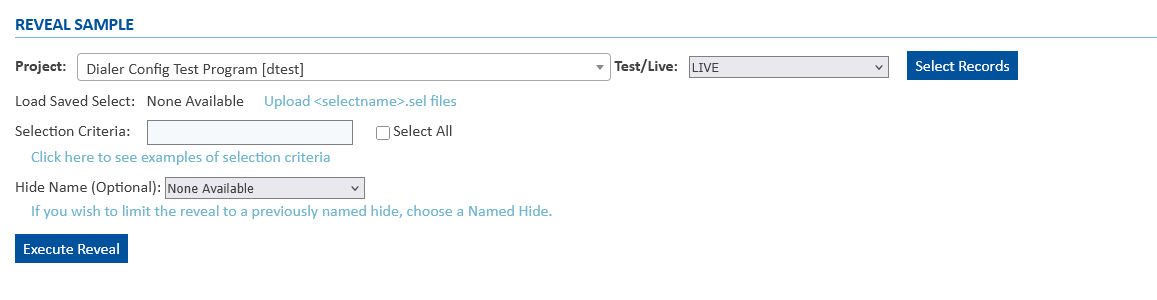
In the above image, you can see all the possible fields needed to fill out to execute the reveal via the console:
- Selection Criteria: This is the "select statement/base" you want to use, i,e, [51#1] or [53#4] or [5121.2$]="NJ"
- Select All: Optionally, checking this INSTEAD of providing a select statement will do as it says, and reveal ALL hidden sample
- Hide Name (Optiona): If you want name hidden records to be revealed, you can use this dropdown to select the specific name. There is a bug though, where a single name may appear hundreds of times. You can just select any one of them, and it encompasses all records that match that name. If you know the name you want, i.e. "Females", you can quickly jump to it by hitting "F" on your keyboard while the dropdown is open, and it will jump to the first one...
- When revealing named hidden records, typically the "Select All" box is checked too, but you can reveal just a subset of the hidden records... i.e. just reveal over50 from the "Females" name, and not all records in the "Females" bucket.
Once you have everything filled out, simply click " Execute Reveal " to send the command to the server.
Confirming Hide/Reveal -- Vial Console
Unlike foneutil and via a super/boss, the console will not immediately let you know how many records were affected. Instead, you need to navigate to the Sample Task Queue to view the status/result. Just like with the hide/reveal, first select the project and Live and then it will appear. It should look similar to the below image:

It will show you the command (Hide/Reveal), if it was named or normal, the #Read(), #Selected(), #Used() as well as WHO executed it (right hand side) and when. commands done via super/boss will just show a 4-digit number, while commands done in the console will show the username. Note: Because foneutil is not part of the console, it will not show any hides/reveals in the sample task queue done via foneutil.
Note: Using the "Include Already Hidden" option in the console will move named hidden records out of their current name and into a new one. This should be used with extreme caution, as it can make sample you don't want to come out, come out when revealed. Example: Females quota closed, so you name_hid them as "Females". later, you name_hide "Democrats" to help with other quotas. If you checked the "Include Already Hidden" box, all FEMALES that are also DEMOCRAT will move into the "Democrats" name now, so when you later reveal the "Democrat" name, all the females that were Democrat will also come back out.
Coordinate with DP Before Hiding on New Projects
Always confirm with DP when hiding sample before a project is launching, as they may not have set the job "fully live" and could undo your hides in the process. Once jobs are live, there is no risk in a programmer undoing them, unless they are rebuilding the files due to errors, or because more sample was being added. When in doubt, reach out.
Things to Know Before You Hide or Reveal
Records currently at the dialer or with an agent will not be hidden. If a number is actively in use on the floor, it will be skipped during the hide operation.
Error records can interrupt the process. Records flagged as errors get skipped, and in some cases they will cause hiding or revealing to stop entirely once the system reaches one. If a hide/reveal seems incomplete, error records may be the cause.
Sometimes it is easier to hide everything and reveal just what you want. If you are trying to isolate a small group of records to dial, it may be simpler to hide all sample first and then reveal only the specific subset -- rather than writing multiple select statements to exclude everything you do not want.
Replicates require special handling. If your project uses replicates (numbered groups of sample), revealing records can put the replicates out of sequence. Records that are out of order may not actually dial. To correct this, IT or DP must either bring the job down to fix the order, or hide all sample and reveal it back one replicate at a time. If you are working on a replicated study, coordinate with DP or IT before revealing sample.
Showing/Listing Names Used
There may be times where someone has to reveal a named hide, but doesn't know the name used, or they have the name, but it isn't revealing the sample. For this reason, IT has created a simple little command that can be run via puTTY that will show you all the names used, and how many records there are within it, for any job specified. To run the command, simply open puTTY and from any folder type the command list_hidden jobname <enter>rand the system will run a count for you, showing all names used, and a count by total and land and cell
CfMC-phone10 /cfmc/phone10/active/fone>list_hidden jobname1

MENTOR ( 9May24) 10.4.2.1 Linux.x64 1004020001 20240509 (get_nhd.spx,-error) - (C) Enghouse Interactive 2024
03 Mar 2026 17:37
System versions: lib=20240509,comp=1004020001,msg=10421,progver=2003,odbc=yes
File versions: qff=2023062101,var=32,quota=9508,db=12,fone=91,stations=1042
DB file /cfmc/phone10/support/phrpt.db opened in READ_ONLY mode
(WARN #9803) Running in >-allowindent mode is not recommended..............................................................................................................
(WARN #9802) Indented Meta/System command? Allowindent is not on, treated as text.
Note: one DOT per 100 cases read ................................................................................................................................................................................................................................................................................................................................................................................................................................................................................................................................................................................................................................................................................................................................................................................................................................................................................
Input data file /cfmc/phone10/active/fone/jobname1.fon closed with 194466 cases read
*** That is All ***
total time: 8 seconds elapsed,   8.37 seconds CPU time

Your name hidden report for jobname1 is ready. Here is what I found. To open the file, view/edit /cfmc/phone10/fone/name_hid.scn
                                                      SCAN of jobname1.fon - Page 1

TABLE 001

ROW: [5270.30$]


                                   TOTAL  LANDLINE CELLPHONE
                               --------- --------- ---------


Total                              26317      4114     22203


blast1_f50p                        10610         -     10610

loop2                                 24         7        17

loop3                                 32         9        23

postgrad                           15651      4098     11553
As you can see in the above code, for the project jobname1 there are 26317 total Name Hidden records, spread across 4 different names, "blast1_f50p", "loop2", "loop3", and "postgrad" These are then the names you would use to reveal them, along with either "all" or a specific select statement.
Common Select Statements Reference
*While every project is unique, there are quite a few common selects that work form all, if not most projects. Project specific selects can typically be found on the CfMC Info Sheet, or by asking DP, if unsure.
| Common Name | Select Statement | Description |
| Phone Number | [1.10#xxxyyyzzzz] | Used to hide a specific phone number. You can technically type in about 5 or so numbers at once, separating each with a comma. |