Troubleshooting - Server/Dialer Crash
Problem: Server/Dialer Crashes... What's Next?
There are many reasons why the Dialer and/or Study Server can crash, but those are for DP/IT to figure out**. This guide is more of a "what to do to get things running again" step-by-step list. Depending on the severity of the crash, various steps may be required. Following along in order helps diagnose the extent of the crash and the best steps to follow. Other times, it may be needed to "Bounce" the dialer or Study Server between shifts, to clear errors, locked files, or free up resources that hung. If this is a planned "Bounce" you can proceed directly to Sections B & C to follow the steps for listed there for "Bouncing". Bouncing steps are the exact same as restarting after a crash, so just follow along in order...
Section A - What actually crashed...?
The first, and most important step is to isolate what actually crashed... the Dialer, Study Server, both, building internet/power, the physical machine, etc. This is accomplished with a few simple steps/tests:
- Step 1 - Is it the power/internet at the building?
- Try opening the Survox Console/Putty
- if it loads, it is NOT Internet, so continue to the next step.
- If the Console/Putty doesn't load, check if other servers work, like the web server or VPN. If they too DO NOT load, it is 100% an internet/building issue. Contact DP/IT to investigate and await further instructions
- Ironically, if you are viewing this document live, it is NOT power/internet, as MAXWell sits on a server IN the building.
- Try opening the Survox Console/Putty
- Step 2 - Check Survox Access
- Once you have confirmed there is power/internet at the building, the next step is to confirm that the Survox Server is operational...
- Putty is your best test here. If you can access the server via puTTY, it means the physical server is running, and accessible, so proceed to step 3.
- If you cannot access the server via puTTY, most likely the physical machine crashed/rebooted. This has to be checked from within the building, by someone with security clearance to access the server room. Contact IT and have them investigate.
- Once you have confirmed there is power/internet at the building, the next step is to confirm that the Survox Server is operational...
- Step 3 - Check if the study server actually running
- Once you have confirmed that the physical server is running and there is power/internet at the building, the next step is to check the actual interviewing server, called the "study server".
- There are 2 ways to quickly check if the study server is running:
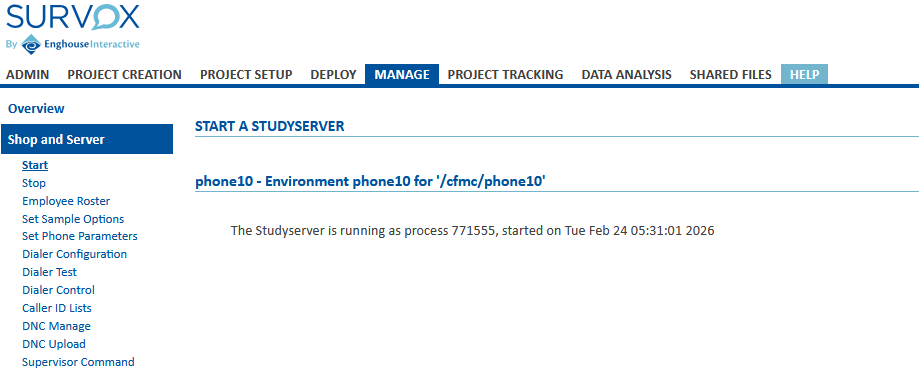
- From the Survox Console, navigate to Manage -> Shop and Server -> Start
- If the study server is running, you will see a message similar to below:

- The other option to check the server status is in puTTY, via a super/boss. If it type in super from putty and it loads, meaning you get the
Enter a SUPERVISOR Command -->prompt, the server is running.
- If either option shows the study server is running, proceed to the next step to further isolate what else may have crashed.
- If after testing the server, it is determined the study server is NOT running, process to Section B to attempt a restart.
- Step 4 - Check Dialer Status
- If you have gotten this far, there is most likely only one thing left that could have crashed, the Dialer. Again, just like with the study server, there are 2 ways to check the Dialer's status...
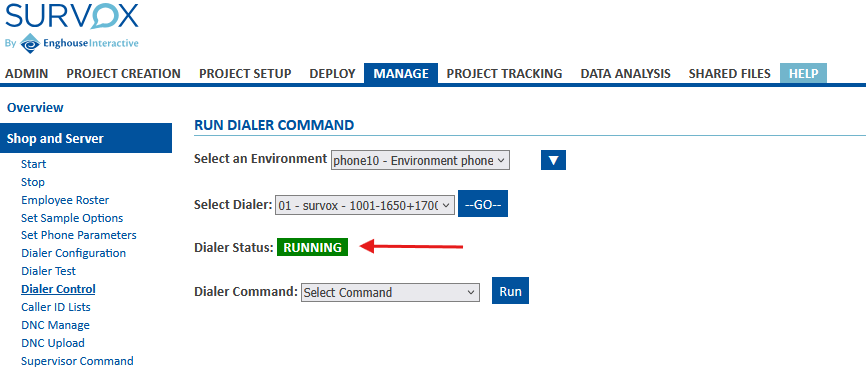
- From the Survox Console, navigate to Manage -> Shop & Server -> Dialer Control and simply click the blue "Go" button to see the dialer's current status
- This will show you if the dialer is running or not.

- The Console will either show RUNNING or NOT RUNNING in the highlighted image above. If the dialer is RUNNING it may just need to be activated on the server, to proceed to Section C, Step 3 to enable dialer control on the study server. If the dialer is NOT RUNNING it needs to be started and initialized on the study server, so proceed to Section C, Step 1 to do a full dialer reset.
- The second way to test the dialer is again via a boss/super. by typing
@testdialer <enter>you will either be met with a dialer not running message or a successful ping response, similar to this:ping command RETURNED (PING 1 2998 11:23:55.547 9901 11:23:55.54 11:23:55.547 ast:20260225112355 11:23:55.588)
- If you have gotten this far, there is most likely only one thing left that could have crashed, the Dialer. Again, just like with the study server, there are 2 ways to check the Dialer's status...
- Step 5 - Other Issues
- If you made it this far and still have not isolated what the issue is, it is most likely something more complex, that requires IT/Survox to diagnose.
- Contact the IT team and explain the issues and what steps you already attempted
- It could be hung apache services, full storage, certificate errors or other issues they are trained to diagnose.
- If you made it this far and still have not isolated what the issue is, it is most likely something more complex, that requires IT/Survox to diagnose.
Section B - Restoring Survox Study Server
More often than not, the study server has crashed from either an error record on a project, a corrupt file being accessed, or an accidental clearing from someone in DP/IT. The process to restart the study server is relatively simple, and can usually be doing via the Console, unless it is "hung/frozen" in which case puTTY is required. Below are the steps to take via the Console. Below those are the additional steps should the Console method fail.
These steps can also be followed if someone requested "bouncing" the server. Bouncing is essentially a planned shutdown & restart of the study server and/or dialer.
Note: Anytime the study server is restarted, it is advised to also restart the dialer, following the steps in Section C. Doing this ensures a clean connection state between the two processes.
- Option 1 - Restart Via the Survox Console
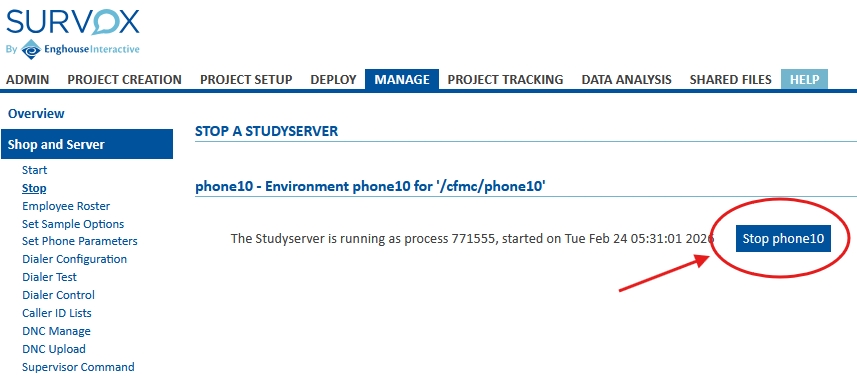
- Once logged in, navigate to Manage -> Shop & Server -> Stop - This is a safety check to make sure the Console doesn't think it is still running. If you see a Process ID showing, with a date/timestamp and "Stop Phone10" like below, that means the Console thinks the study server is still running, so only proceed if you are 100% sure the server is crashed or needs to be "bounced".

-
If the screen shows No Studt Server loaded, you can proceed with starting the server up. Just click on the "Start" option under Shop & Server. - This screen will give you the option to "Start phone10" if it is not already running. Simply click that button and wait for the Console to confirm back if the server started properly or not.
- If there are errors when restarting, proceed to the "Advanced" option of restarting via putty below.
- If the server loaded properly, the next step it to reinitialize the Dialer, so proceed to Section C.
- Once logged in, navigate to Manage -> Shop & Server -> Stop - This is a safety check to make sure the Console doesn't think it is still running. If you see a Process ID showing, with a date/timestamp and "Stop Phone10" like below, that means the Console thinks the study server is still running, so only proceed if you are 100% sure the server is crashed or needs to be "bounced".
- Option 2- Restart via PuTTY (Advanced Mode)
- Restarting the study server via putty is more informative on what is happening but takes a little more understanding of puTTY and linux. Below should give you all the information you need though. If this is a scheduled "bounce" it is recommended to cleanly shut down the server, via the console and only follow the below steps for "hung/frozen" study servers
- First, connect the study server via puTTY, as the normal cfmc user.
- Second - Check for an active/hung study server process by typing the following into puTTY:
srvrchk <enter>- This will either show you nothing, or a stdysrvr process running.
- If nothing is shown, proceed to the next step
- If a process id is shown, we need to clear it first, using the linux command "kill" which will IMMEDIATELY kill the study server process, disconnecting all intv sessions, super/boss sessions, and anything else running interactively.
- Note: the process ID is randomly assigned each time a process starts, so it will NOT be the same each time you start/restart a server
- To kill the process is simple... type
kill -9 process_id <enter>and it will immediately stop the study server process. - The full identify/clear/check process is shown in the below example, where the server's process ID is listed as 771555:
## ===== Check for Active study server CfMC-phone10 /cfmc>srvrchk Checking for active STDYSRVR process ID... If nothing appears below, there is no server active. However, if there is information shown, take note of the process ID listed PROCID ------ VvVvVv 771555 cfmc 20 0 336308 83852 10032 S 0.0 0.1 0:35.49 stdysrvr ## ===== FORCE CLEAR the study server CfMC-phone10 /cfmc> kill -9 771555 <-- immediately kills the process ID of the study server ## ===== RECHECK for active Study Server CfMC-phone10 /cfmc>srvrchk Checking for active STDYSRVR process ID... If nothing appears below, there is no server active. However, if there is information shown, take note of the process ID listed PROCID ------ VvVvVv <-- nothing shown this time, confirms server is down CfMC-phone10 /cfmc> - Once you have confirmed the "stdysrvr" process is not running, you can start the server back up. This is done with a single command in puTTY:
server_start.pl ALL <enter>and it can take 30-60 seconds to start. Hitting <enter> 2-3 more times helps speed it up, but when done, it should echo back that the server is started and running on a new PID. If not, there is something more complex going on and IT needs to step in. This process also attempts to restart the dialer as well, but it is always advised to still manually restart the dialer separately, following the steps in Section C. - After puTTY shows the server has successfully been restarted, you can again confirm if the stdysrvr process started, but running the
srvrchk <enter>command again and making sure it shows a new Process ID. - The final test that the server loaded properly is to try to access a super/boss. If that loads cleanly, the server has been started/restarted/bounced and you are good to resume operations... assuming you do not also need to bounce the dialer, in which case read on below...
- This will either show you nothing, or a stdysrvr process running.
Section C - (Re)Starting the Survox Dialer
Just like with the study server, the dialer can crash for various reasons. Most commonly it has to do with either changes made to the system or storage related problems. DP/IT can diagnose why it crashed later, the main goal of this section is to get the dialer up and running again. Unlike the study server though, the dialer can ONLY be stopped/started/bounced via the console. However, puTTY is useful to check the status prior to doing anything, and again afterwards to ensure it is running properly.
- Step 1 - Shutdown Dialer on Study Server
- From the Console, navigate to Manage -> Shop & Server -> Dialer Control
- Click the blue "--Go--" button to load the dialer
- If the Dialer status shows as RUNNING then follow the below steps to clear it. However if it shows as NOT RUNNING then the dialer is already shutdown and you can proceed to step 2 to restart it.
- Under Dialer Command, pick the option to "CLOSE DIALER" and click RUN it should then respond back if the command was successful or not.
- Under Dialer Command, pick the option to "WIPEOUT DIALER" and click RUN it should then respond back if the command was successful or not.
- NOTE: These 2 commands, while similar, do different things. CLOSE just tells the study server it is not using the dialer anymore, while WIPEOUT actually shuts the dialer process down.
- After you have issued both CLOSE & WIPEOUT, you need to refresh the dialer status the console sees. Simply click the --Go-- button again to refresh, and now the dialer should show as NOT RUNNING
- Step 2 - Start Dialer
- Once confirmed that the dialer shows as NOT RUNNING you can start it back up. Just like with shutting it down, you use the Dialer Command options.
- The first step is to select "INITIALIZE DIALER" and then clicking RUN
- Second, assuming you get a "Dialer Initialized OK" or similar message, pick the second option the list, "HANDSHAKE DIALER" and again click RUN
- These commands are the same as the super/boss command @startdialer (initialize) and @testdialer (handshake).
- If either the INITIALIZE or HANDSHAKE commands fail, it doesn't necessarily mean the dialer didn't start... there can sometimes be a few second delay after the command runs, that makes the console think it didn't load. To test, click the --Go-- button again. If it shows as RUNNING then just proceed to the last step. But... If it still shows as NOT RUNNING, then you need to engage with DP/IT to investigate further.
- Once confirmed that the dialer shows as NOT RUNNING you can start it back up. Just like with shutting it down, you use the Dialer Command options.
- Step 3 - Final Confirmation
- While not entirely needed, if the INITIALIZE and HANDSHAKE commands worked, and the screen shows as RUNNING, it is always best to do one last check via a super/boss in puTTY.
- Open putty and launch a super/boss
- type
@startdialer <enter>and then put in the 2-digit confirmation code. If the dialer is properly initialized, the super/boss should respond backinit command SUCCEEDED. if not, try doing another@cleardialerand then a second@startdialer - Once you get a successful initialize command response, do one last
@testdialer <enter>and enter the 2-digit code to issue the handshake one last time. This should echo back something similar toping command RETURNED (PING 1 2998 11:23:55.547 9901 11:23:55.54 11:23:55.547 ast:20260225112355 11:23:55.588)
- While not entirely needed, if the INITIALIZE and HANDSHAKE commands worked, and the screen shows as RUNNING, it is always best to do one last check via a super/boss in puTTY.
Conclusion
If following all the steps listed above, you are still unable to get the study server, dialer or both systems back up and running, something is gravely wrong, and you should IMMEDIATELY contact IT for help. There are a lot of moving parts behind the scenes, that while may not seem connected, actually are, and IT is trained to identify them quickly.
In most cases though, the above steps are the exact same thing IT would do if you contacted them and said the server crashed.
**IMPORTANT FOOTNOTE - If you ever do these steps on your own, it is still important to let IT know there was a crash, so they can investigate the initial cause, to hopefully prevent it from happening again, or at the very least make sure Survox is aware it happened, so they can isolate the issue and prevent it in future software releases.